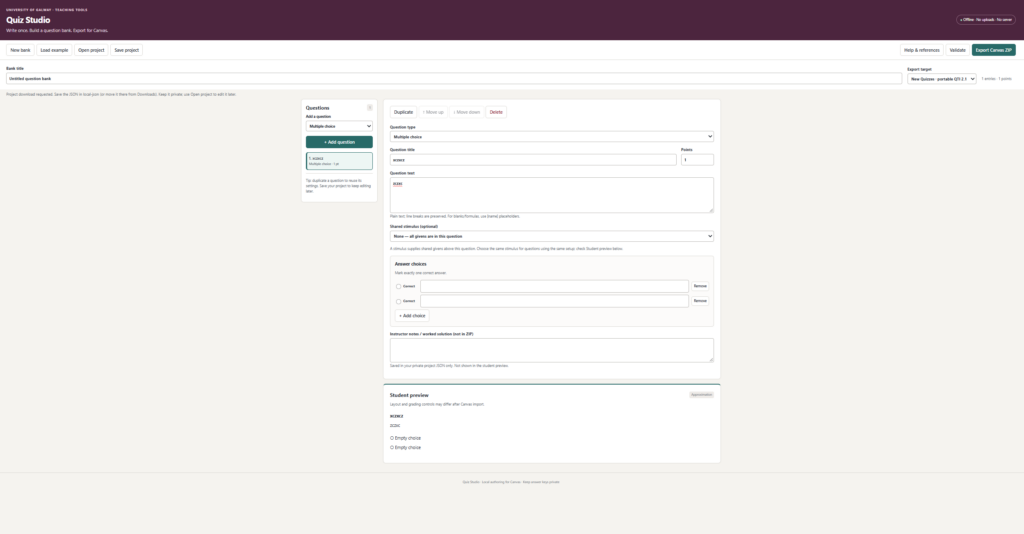
This resource provides a practical way to reduce the time and effort involved in preparing large question banks for Canvas. Instead of manually entering each question, faculty and instructional designers can convert existing Word-based assessment files into structured JSON, review the full bank in an offline editor, and validate the content before import. The main benefit is efficiency: the workflow supports faster course setup, reduces formatting errors, and helps maintain consistency across repeated assessments. It also makes it easier to review and improve question quality, including clarity, accessibility, and alignment with learning outcomes.
To make the best use of this resource, users should begin with a well-structured Word document, use the AI-assisted conversion to generate the initial json format, and then carefully review the entire question bank in the editor before generating the zip file to be uploaded. This review process is especially important for checking answer keys, item types, distractors, and formatting issues that could otherwise affect student experience. After validation, the bank can be imported directly into Canvas.
In academic settings, this resource can be applied in several ways. For example, an instructor preparing a large introductory course could convert a legacy exam bank into Canvas without re-entering hundreds of questions manually. An academic developer supporting multiple sections of the same course could use a shared question bank to standardize assessment practices and reduce duplication of effort. The tool is particularly useful in programs that rely on high-volume assessment creation, repeated assessments, or frequent revisions to course materials.
This resource is valuable because it supports both efficiency and quality in assessment design.The user can use institutional AI tools to generate a simple question to tool readable json format